
ZOLL Respond: Streamlined Emergency Response Management
Overview
ZOLL Respond is a mobile application designed for medical professionals involved in emergency response operations. Developed by ZOLL Data Systems Inc., it serves as a comprehensive response management solution tailored for existing ZOLL customers. The app supports emergency medical services (EMS), critical patient transport, and coordinated response efforts across response crews, dispatchers, and medical facilities.
Its primary function is to enable real-time access to trip information, allowing users to efficiently manage and respond to emergency calls. The application facilitates navigation to pick-up and drop-off locations, enhancing coordination during high-pressure scenarios. By integrating response planning with location-based tools, ZOLL Respond aims to reduce response time and improve operational efficiency.
The app is specifically built for the iPhone platform, targeting healthcare professionals who rely on timely, accurate information during emergencies. While the developer did not provide additional details on system requirements or broader use cases, the application appears optimized for mobile use in field operations. Its focus on seamless communication and trip management makes it a practical tool for teams requiring reliable, on-the-go response coordination.
Key Features & Capabilities
- Real-Time Trip Management: Enables response crews and dispatchers to view active trips, update status, and coordinate response actions instantly.
- Integrated Navigation: Provides turn-by-turn guidance to pick-up and drop-off points, supporting efficient route planning during emergency operations.
- Role-Based Access: Offers tailored views for dispatchers, medical personnel, and facility staff, ensuring relevant information is available based on user role.
- Secure Data Handling: Maintains confidentiality and integrity of patient and operational data within a controlled environment for ZOLL customers.
- Seamless Integration: Designed to work with existing ZOLL systems, ensuring continuity in response workflows and data consistency.
These capabilities support real-world scenarios such as coordinating ambulance arrivals, managing patient transfers between facilities, and updating response teams on changing conditions. The application streamlines communication across teams, minimizing delays and enhancing situational awareness. By centralizing trip data and navigation tools, ZOLL Respond reduces the risk of miscommunication during time-sensitive operations. The developer did not specify additional features beyond those listed, and no performance benchmarks were provided. However, the focus on core response functions suggests a targeted, efficient design aimed at reliability in critical environments.
User Interface, Workflow & Performance
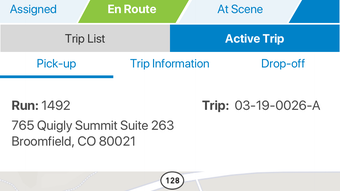
The user interface of ZOLL Respond is structured to support rapid decision-making in high-stress environments. Navigation is streamlined, with key actions such as trip acceptance, route initiation, and status updates accessible through intuitive touch controls. The layout prioritizes clarity, displaying essential trip details including location, patient information, and estimated arrival times.
Workflow efficiency is enhanced by minimizing the number of steps required to respond to a call or update a trip status. Users can quickly access maps, initiate navigation, and communicate with dispatchers without switching between multiple screens. The app’s performance is expected to align with standard iOS application behavior, though exact resource usage details were not specified.
Stability and responsiveness are likely optimized for field use, where uninterrupted access is critical. The developer did not provide information on CPU or RAM consumption, nor did they share data on background processing or battery impact. Performance observations are based on general software behavior patterns for mobile applications in emergency services.
Compatibility & System Requirements
ZOLL Respond is designed exclusively for the iPhone platform, with a release version of 1.0. The application has a file size of 12.4 MB, indicating a lightweight footprint suitable for mobile devices with limited storage. It is available as a free download, with no cost associated with installation or use.
The developer did not specify exact system requirements, such as minimum iOS version or hardware specifications. Compatibility information was partially provided, confirming support for iPhone devices only. No details were given regarding iPad, Mac, or other platforms.
Users should ensure their device meets the minimum requirements for running current iOS versions, though these were not listed. The absence of detailed technical specifications limits the ability to assess compatibility with older or low-end devices. However, the app’s size suggests it is optimized for efficient deployment across a range of iPhone models.
Pros and Cons
Pros
- Free to download and use, reducing operational costs for EMS providers.
- Specifically designed for emergency response workflows, enhancing operational efficiency.
- Integrated navigation supports real-time route guidance during patient transport.
- Role-based interface ensures relevant information is available to each user type.
- Lightweight file size (12.4 MB) allows for quick installation and minimal storage use.
Cons
- Platform is limited to iPhone, restricting use on other mobile devices.
- Exact system requirements and compatibility details were not provided.
- Limited to existing ZOLL customers, reducing accessibility for broader user groups.
- No information on offline functionality or data sync behavior.
- Performance and resource usage data were not disclosed.
FAQ Section
Is ZOLL Respond available for devices other than iPhone?
Currently, the application is designed exclusively for iPhone. There is no public information on support for iPad, Android, or other platforms.
Is the app secure for handling patient information?
ZOLL Respond is intended for use by existing ZOLL customers and is designed with secure data handling practices. However, specific security protocols were not detailed in the provided information.
How often does the app receive updates?
Update frequency is not specified. Users should check the App Store for the latest version and release notes.
What type of license does ZOLL Respond use?
The app is offered free of charge and does not require a traditional license. Access is restricted to existing ZOLL customers.
Can I use ZOLL Respond without an internet connection?
Information about offline functionality was not provided. The app likely requires an active connection for real-time trip data and navigation.
Final Thoughts + CTA
ZOLL Respond delivers a focused, role-specific solution for emergency response teams relying on ZOLL systems. Its streamlined interface, integrated navigation, and real-time trip management make it a practical tool for improving coordination and response speed. While platform limitations and the lack of detailed system information restrict broader adoption, its targeted design and free availability make it a compelling option for eligible users.
Medical professionals and EMS organizations already using ZOLL solutions will find immediate value in its workflow integration. For those in the field who need reliable, on-the-go response tools, ZOLL Respond offers a secure and efficient platform. The app’s lightweight nature and clear functionality further enhance its appeal.
Download ZOLL Respond now to optimize your emergency response operations with a dedicated, mobile-first solution.







